

Table of Contents
- Assess Your Current Desk Setup and Identify Problem Areas
- Implement Cable Management Solutions to Reduce Visual Clutter
- Maximize Vertical Desk Storage Ideas for Small Spaces
- Organize Drawers with Dividers and Categorized Storage
- Apply Minimalist Desk Organization Ideas to Stay Clutter-Free
- Add Lighting and Ambiance for a Focused Remote Office Setup
- Maintain Your Organized Desk with Daily Habits
- Conclusion
- Frequently Asked Questions
Last Updated: September 18, 2026
Assess Your Current Desk Setup and Identify Problem Areas
Before you start buying organizers or rearranging your workspace, take a hard look at what you're actually working with to organize small home office desk effectively. Most people jump straight to solutions without understanding their real problem. That's backwards.
Spend 15 minutes observing your desk as it exists right now. Where do cables bunch up? Which drawers overflow? What items end up scattered across your desktop surface every single day? These patterns tell you exactly where your system is failing.
Write down three specific pain points. Don't say "it's messy." Say "my monitor cables tangle behind my desk" or "pens and sticky notes bury my keyboard." Specific problems have specific fixes.
The goal here is simple: you're building a baseline. You need to know what a clutter-free workspace actually looks like for YOUR setup, not someone else's. A small home office desk requires ruthless honesty about what you actually use versus what you're keeping out of habit.
At The Reset Aisle, we help you make the items you already own work more effectively for your lifestyle. Our mission is to eliminate overwhelm through simple, functional storage that keeps your living space neat and under control. Once you know your real constraints, organizing becomes straightforward instead of frustrating.
Implement Cable Management Solutions to Reduce Visual Clutter
Cables are the number one visual clutter culprit in any workspace. They tangle. They hide dust. They make a tidy desk look chaotic in seconds.
Good cable management isn't about perfection. It's about containment. The goal is simple: cables should be invisible or neatly bundled, never sprawling across your desktop surface.
Route Cables Behind Your Monitor and Along the Desk Edge
Start by identifying every cable connected to your setup. Monitor. Keyboard. Mouse. Lamp. Chargers. Count them. Most people are shocked they have 8-12 cables running to their desk.
Here's the move: route cables behind your monitor first. Your monitor is the tallest object on your desk, so it naturally hides cables running down the back. Run them down the monitor stand, then along the back edge of your desk away from view.
Use adhesive cable clips to secure them to the desk edge or monitor stand. These small clips cost very little and make a huge difference. They keep cables from dangling and tangling.
The cables that run to power outlets should follow the desk edge, not cut across the middle. This keeps your desktop surface clear for actual work.
Use Cable Clips and Sleeves to Bundle Wires Together
Cable clips are small plastic holders that grip individual cables and keep them stationary. Place them every 12 inches along your cable route. This prevents cables from sliding around and creating visible bunches.
For cables that run together (like monitor and keyboard wires), use cable sleeves. These fabric tubes bundle multiple cables into one neat package. A single sleeve containing four cables looks infinitely cleaner than four loose wires.
Cable management boxes are another option for power strips and extra cables. These sit under your desk and hide the visual chaos of multiple power adapters and extension cords. They're particularly useful if your desk is against a wall where people can see underneath.
The payoff is immediate. Once cables are managed, your entire workspace feels more intentional and less overwhelming.
Maximize Vertical Desk Storage Ideas for Small Spaces
When your desk surface is tiny, you have to think up, not out. Vertical storage is how you fit more into less.
The key is using wall space and vertical surfaces that would otherwise sit empty. A small home office desk benefits enormously from smart vertical storage because it keeps your work surface clear.
Install Wall-Mounted Shelves Above Your Desk
Wall-mounted shelves are the fastest way to add storage without eating into your desk footprint. Install them 18-24 inches above your desk. This puts them within arm's reach but high enough that they don't block your sightline.
Use floating shelves if you want a clean look. They require no visible brackets and create a minimalist aesthetic. If you prefer something sturdier, standard shelves with brackets work just fine.
Keep only active items on these shelves. Your current project files. Reference books you use weekly. A small plant for ambiance. Don't use shelf space as a dumping ground for "someday" items. That defeats the purpose.
One shelf can hold 15-20 items without looking cluttered. Two shelves give you plenty of breathing room. Three shelves start to feel cramped unless you're very selective.
Add a Pegboard for Flexible Tool and Supply Storage
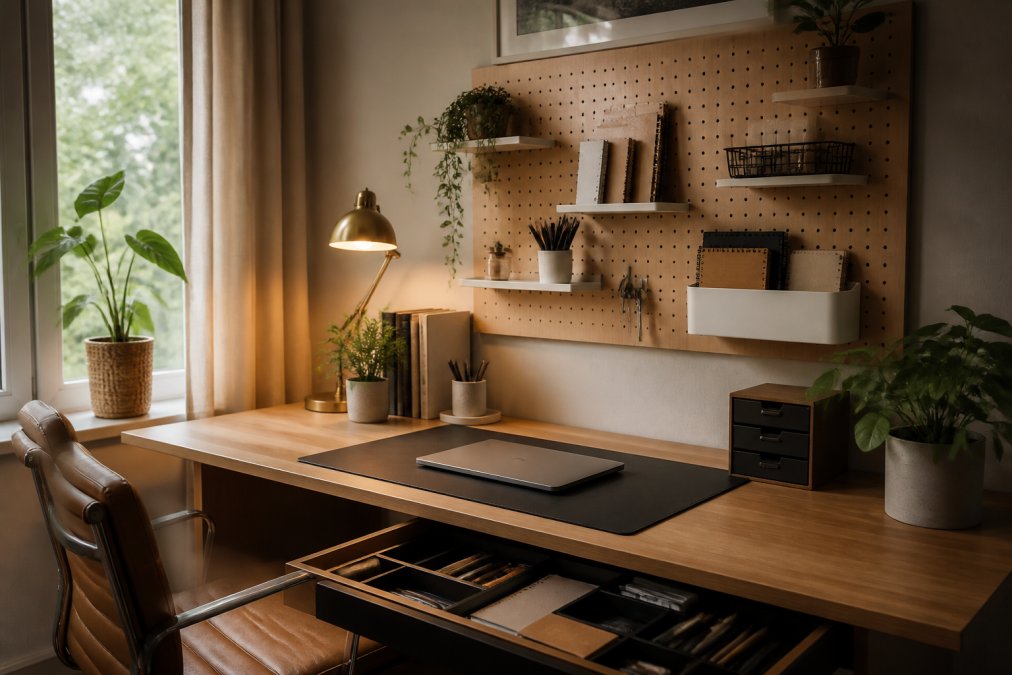
A pegboard is the most flexible vertical storage solution. You hang it on the wall and customize it with pegs, hooks, and shelves to match your exact needs.
Pegboards work best for items you use frequently. Headphones. Charging cables. Scissors. Notepads. Reference materials. Anything you grab multiple times per day should be on your pegboard, not buried in a drawer.
The beauty of pegboards is that you can rearrange them instantly. As your workflow changes, your pegboard changes with it. No permanent commitment to a fixed layout.
Paint your pegboard to match your desk or wall color. This makes it feel intentional rather than utilitarian. A pegboard that coordinates with your workspace becomes part of the design, not an eyesore.
Organize Drawers with Dividers and Categorized Storage
Your desk drawers are either working for you or working against you. Most people open a drawer and find chaos. Pens mixed with cables. Notepads buried under receipts. Scissors wedged between papers.
Drawer dividers are the fix. They create compartments so every item has a home. When everything has a designated spot, you find what you need in seconds instead of searching.
Start with your top drawer. This is your "active use" drawer. It should contain only items you grab multiple times per day. Pens. Notepads. One pair of scissors. A highlighter. Nothing else.
Use dividers to create sections. One section for writing tools. One for notepads. One for charging cables if they live in your desk.
Apply Minimalist Desk Organization Ideas to Stay Clutter-Free
Minimalism isn't about owning nothing. It's about owning only what serves your actual life. A minimalist desk is one where every item has a purpose and a place.
Keep Only Essential Items on Your Desktop Surface
Your desktop surface should contain:
- Your monitor
- Your keyboard
- Your mouse or trackpad
- A desk lamp if you need it
- One small item you're actively using right now
That's it. Everything else goes into drawers, shelves, or off your desk entirely.
Use a Desk Mat to Define Your Workspace and Contain Clutter
A desk mat is a simple tool with a big impact. It visually defines your work zone and creates a boundary between your workspace and the rest of your desk.
Add Lighting and Ambiance for a Focused Remote Office Setup
Bad lighting makes any workspace feel chaotic. It strains your eyes. It makes you feel tired. It's harder to notice when your desk is messy because you can't see clearly.
Maintain Your Organized Desk with Daily Habits
Organization isn't a one-time project. It's a daily practice. You can organize your desk perfectly today, but without habits to maintain it, you'll be back to chaos within a month.
Conclusion
Organizing a small home office desk isn't about buying more stuff. It's about making the space you have work harder for you. Cable management, vertical storage, drawer dividers, minimalism, and lighting are the five pillars that transform a chaotic desk into a functional workspace.
Frequently Asked Questions
How do I organize a small office desk without drawers?
Use vertical storage solutions like wall-mounted shelves, pegboards, and under-desk storage racks to maximize space. Desk organizers with compartments, cable management boxes, and desktop risers with built-in storage create additional surfaces without taking up floor space. A desk mat defines your workspace and keeps supplies contained. Prioritize items you use daily and store the rest in nearby closets or cabinets to keep your desktop surface clear.
What cable management solutions actually work for small desks?
Cable clips and adhesive-backed sleeves bundle wires together and route them behind your monitor or along the desk edge. A cable tray mounted under your desk keeps cords organized and out of sight. Cable ties secure groups of wires, while a cable management box hides power strips and excess length. The key is routing cables immediately after setup, don't let them pile up. Route everything behind your monitor stand or along the back edge to free up desktop real estate.
What are the best space-saving desk accessories for a small workspace?
Monitor stands with under-desk storage, desk organizers with drawer dividers, pegboards for wall mounting, and vertical filing systems maximize every inch. A desk mat defines your workspace and prevents items from sliding. Cable management boxes hide power cords. Under-desk shelving and wall-mounted organizers pull storage off your desktop surface. Choose multi-functional pieces like desk lamps with built-in organizers or monitor stands that double as storage. Focus on vertical solutions rather than horizontal expansion to preserve your limited desktop surface.
How do I keep my organized small desk from becoming cluttered again?
Set a daily five-minute reset habit: return items to their designated spots, file papers, and clear your desktop surface each evening. Establish a rule that only active projects stay on your desk; archive completed work immediately. Use drawer dividers and labeled storage so everything has a specific home. Limit desk accessories to items you use daily. Review your setup monthly and remove anything that no longer serves your workflow. The simpler your system, the easier it is to maintain long-term.